Axios npm Compromise (March 31, 2026): How to Check Your Project and Runtime for Exposure
Step-by-step guide to auditing your Node.js project for the Axios supply chain attack that shipped a remote access trojan via plain-crypto-js. Includes a ready-to-paste AI audit prompt, IOC checklist, and SecureNow forensics queries to detect runtime compromise.

Axios npm Compromise (March 31, 2026): How to Check Your Project and Runtime for Exposure
Axios 1.14.1 and 0.30.4 ship a remote access trojan via plain-crypto-js — copy this prompt into your AI editor to audit your project in 30 seconds.
You are acting as a senior Node.js supply-chain incident responder.

Goal:
Perform a read-only audit of this project for exposure to the March 31, 2026 Axios npm compromise.

Important constraints:
- Detection only
- Do not modify any files
- Do not remove packages
- Do not run install, uninstall, update, dedupe, prune, or any other package-manager mutation
- Do not execute shell commands that change the system
- Do not auto-fix anything
- Only inspect and report

Known bad packages / versions to detect:
- axios@1.14.1
- axios@0.30.4
- plain-crypto-js@4.2.1

Also inspect for related suspicious indicators:
- plain-crypto-js
- sfrclak.com
- 142.11.206.73
- unexpected postinstall / install / prepare hooks
- vendored copies of axios inside dependencies
- @qqbrowser/openclaw-qbot@0.0.130
- @shadanai/openclaw versions 2026.3.28-2, 2026.3.28-3, 2026.3.31-1, 2026.3.31-2

Scope to inspect:
- package.json
- package-lock.json
- npm-shrinkwrap.json
- pnpm-lock.yaml
- yarn.lock
- .npmrc
- Dockerfiles
- CI/CD workflow files
- build scripts
- node_modules if present
- any vendored dependency folders in the repo

What to do:
1. Search the repo for:
   - "axios"
   - "plain-crypto-js"
   - "sfrclak"
   - "142.11.206.73"
   - "postinstall"
   - "prepare"
   - "install"
2. Determine whether the project directly references any compromised package/version.
3. Determine whether the lockfile references any compromised package/version transitively.
4. Check semver ranges that could have resolved to the bad Axios versions, especially:
   - ^1.14.0
   - ^0.30.0
5. If node_modules exists, inspect whether an installed dependency tree contains:
   - axios@1.14.1
   - axios@0.30.4
   - plain-crypto-js@4.2.1
   - suspicious package scripts or vendored copies
6. Inspect package scripts and dependency metadata for anything suspicious related to postinstall behavior.
7. Inspect CI, Docker, or build files for installs that may have consumed a compromised range during the incident window.

Output format:
- Executive summary
- Findings
- Evidence by file
- Direct exposure: yes/no
- Transitive lockfile exposure: yes/no
- Installed dependency exposure: yes/no / unknown
- Suspicious scripts or IOCs found: yes/no
- Files reviewed
- Risk summary with exactly one of:
  - No exposure found
  - Lockfile exposure found, no install evidence
  - Installed malicious package detected, treat host/CI as potentially compromised
  - Inconclusive, not enough files present

Important:
- Do not suggest or apply fixes unless asked later
- If you find exposure, report the exact file paths and exact versions
- If you find only semver risk but no resolved bad version, state that clearly
- Be precise and conservative
Works in Cursor, GitHub Copilot, ChatGPT, Claude, or any LLM IDE. Open your project, open a chat, paste the prompt above. It performs detection only — it will not modify files, run installs, or apply fixes.
The audit covers your codebase — but it only checks static files. It cannot tell you whether the trojan already executed on a server, CI runner, or developer machine. For that, you need runtime evidence. Skip to Step 2: Check your runtime with SecureNow Forensics for the runtime check.
What Happened
On March 31, 2026, one of the most popular packages in the JavaScript ecosystem was weaponized. Two malicious versions of Axios — 1.14.1 and 0.30.4 — were published directly to the npm registry, each pulling in a brand-new dependency called plain-crypto-js@4.2.1 that delivered a multi-platform remote access trojan.
Axios has 100 million weekly downloads. If your project uses a caret range like ^1.14.0 or ^0.30.0, a single npm install during the incident window could have silently installed the compromised version — and executed the malware via a postinstall hook.
The Attack Sequence
- March 30, 23:41 UTC — A clean typosquat package
plain-crypto-js@4.2.0was published to npm bynrwise@proton.me. It was an inert copy of the legitimatecrypto-jslibrary. - March 30, 23:59 UTC —
plain-crypto-js@4.2.1was published, now containing apostinstallhook (setup.js) with an obfuscated dropper. - March 31, ~00:00 UTC —
axios@1.14.1was published withplain-crypto-jsadded as a new dependency.axios@0.30.4followed within 39 minutes, poisoning both the 1.x and 0.x release branches. - March 31, 00:05 UTC — Socket's automated scanner flagged
plain-crypto-jsas malicious within six minutes.
The malicious versions do not appear in the Axios GitHub repository's tags. The last legitimate release is v1.14.0. This strongly suggests the attacker published directly to npm using a compromised token rather than going through the project's standard release workflow.
The Payload: A Multi-Platform RAT
The postinstall hook in plain-crypto-js@4.2.1 runs setup.js, which:
- Detects the operating system (
win32,darwin, or Linux) - Downloads a platform-specific second-stage payload from
sfrclak[.]com:8000 - Executes it in the background
- Deletes
setup.jsand replacespackage.jsonwith a clean copy to destroy forensic evidence
macOS: Drops a Mach-O binary to /Library/Caches/com.apple.act.mond disguised as a system daemon. The binary is a full RAT supporting arbitrary command execution, binary injection (peinject), AppleScript execution, and filesystem enumeration. It beacons to the C2 every 60 seconds.
Windows: Copies powershell.exe to %PROGRAMDATA%\wt.exe (disguised as Windows Terminal) and runs an obfuscated .ps1 script via a hidden VBScript wrapper.
Linux: Downloads a Python script to /tmp/ld.py and runs it detached with nohup.
Known IOCs
| Type | Indicator |
|---|---|
| Malicious packages | axios@1.14.1, axios@0.30.4, plain-crypto-js@4.2.1 |
| C2 domain | sfrclak[.]com |
| C2 IP | 142.11.206.73 |
| C2 URL | http://sfrclak[.]com:8000/6202033 |
| POST body (macOS) | packages[.]npm[.]org/product0 |
| POST body (Windows) | packages[.]npm[.]org/product1 |
| POST body (Linux) | packages[.]npm[.]org/product2 |
| macOS artifact | /Library/Caches/com.apple.act.mond |
| Windows artifacts | %PROGRAMDATA%\wt.exe, %TEMP%\6202033.vbs, %TEMP%\6202033.ps1 |
| Linux artifact | /tmp/ld.py |
| Related packages | @shadanai/openclaw@2026.3.31-1, @shadanai/openclaw@2026.3.31-2, @qqbrowser/openclaw-qbot@0.0.130 |
What the Audit Prompt Checks
The prompt above covers seven layers of exposure:
| Check | Why it matters |
|---|---|
Direct dependencies in package.json | Catches projects that explicitly depend on a compromised version |
| Transitive dependencies in lockfiles | Catches cases where a safe-looking package.json resolved to a bad version through the lockfile |
Semver range risk (^1.14.0, ^0.30.0) | Identifies ranges that could resolve to the bad version on the next install, even if they haven't yet |
Installed node_modules | Detects whether the malware actually exists on disk and may have already executed its postinstall |
| Vendored copies | Packages like @qqbrowser/openclaw-qbot shipped a tampered axios@1.14.1 inside their own node_modules |
| CI/Docker files | A npm install in a GitHub Actions workflow during the incident window may have pulled the bad version into your CI environment |
IOC strings (sfrclak.com, 142.11.206.73) | Detects residual artifacts if the dropper partially executed or if source code references the C2 |
The prompt explicitly forbids any mutation — no npm install, no npm update, no file writes. It is safe to run against production codebases.
Step 2: Check Your Runtime with SecureNow Forensics
The audit prompt tells you whether the malicious package exists in your code. It cannot tell you the harder question: did the trojan actually execute on a server, CI runner, or developer machine?
That requires runtime evidence — network logs, trace data, and build output. If your applications are instrumented with the securenow npm package, that evidence is already being collected. Every outbound HTTP call your application makes is recorded as an OpenTelemetry span. Every log line from your build pipeline is indexed.
The Forensics chat in the SecureNow dashboard lets you search all of that data in plain English — no SQL, no log query syntax, no switching between twelve different tools. Open Dashboard → Forensics, type a question, and get results in seconds across every application you monitor.
Here is a real investigation we ran on our own production apps — seven natural-language questions covering every published IOC, from C2 domains to RAT filesystem artifacts:
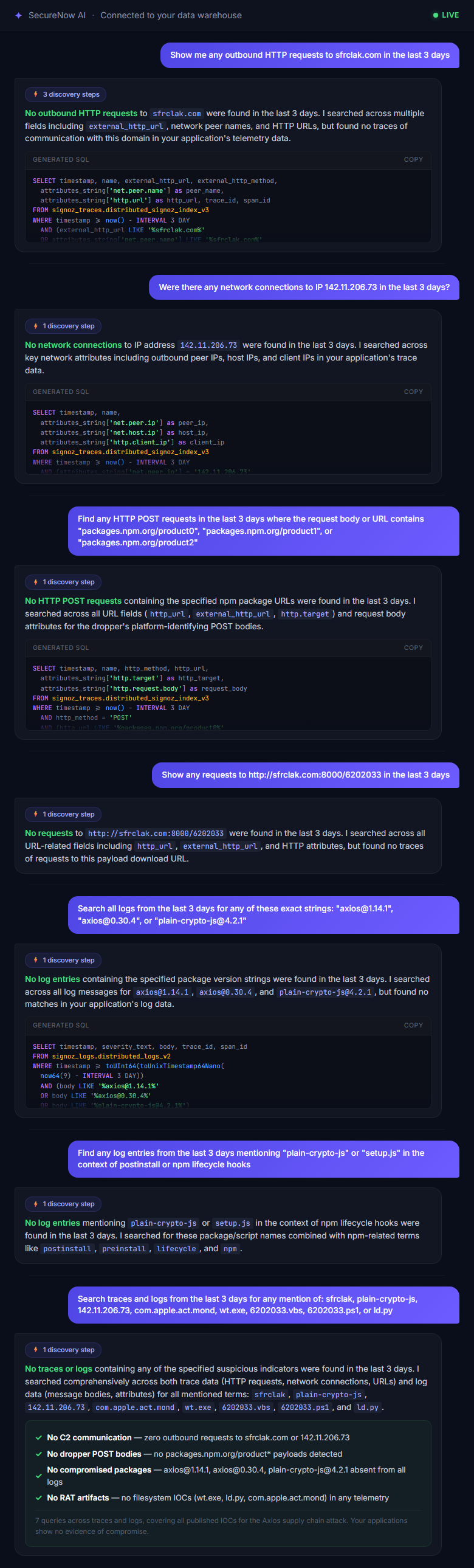
All seven queries came back clean. That is the answer you want — no evidence of compromise — and you get it in under a minute, across every application you monitor, without writing a single line of SQL.
Below are the exact questions from that investigation. Paste them into Dashboard → Forensics to run the same sweep on your own data.
Hunt 1: Network Beacons to the C2
The dropper and the RAT both make outbound network calls to known infrastructure. These are the prompts to paste into Forensics:
Search for the C2 domain:
Show me any outbound HTTP requests to sfrclak.com in the last 3 days
If the dropper executed inside your application process, the OpenTelemetry HTTP instrumentation captures the beacon as a client span. This query finds it.
Search for the C2 IP address:
Were there any network connections to IP 142.11.206.73 in the last 3 days?
Catches connections made directly to the IP, even if the domain name never appeared in DNS.
Search for the dropper's POST bodies:
Find any HTTP POST requests in the last 3 days where the request body or URL contains "packages.npm.org/product0", "packages.npm.org/product1", or "packages.npm.org/product2"
The dropper sends these platform-identifying POST bodies to the C2. They are designed to look like npm traffic at a glance, but npm.org is not the npm registry — registry.npmjs.org is. Any match is a confirmed positive.
Search for the exact C2 retrieval URL:
Show any requests to http://sfrclak.com:8000/6202033 in the last 3 days
This is the dropper's payload download URL. A match means postinstall executed and attempted to fetch the second-stage RAT.
Hunt 2: Malicious Package Versions in Build Logs
The trojan may have executed during npm install in a CI pipeline or Docker build — not inside your running application. npm prints the full dependency tree to stdout during install, so the compromised version strings appear in build output. If your CI logs flow into SecureNow, these prompts will surface them:
Search for compromised package installs:
Search all logs from the last 3 days for any of these exact strings: "axios@1.14.1", "axios@0.30.4", or "plain-crypto-js@4.2.1"
This is the highest-confidence signal. If any build run resolved to these exact versions, the postinstall hook fired on that machine.
Search for postinstall execution evidence:
Find any log entries from the last 3 days mentioning "plain-crypto-js" or "setup.js" in the context of postinstall or npm lifecycle hooks
npm logs lifecycle hook execution. If the dropper ran, this surfaces the event.
Broad IOC sweep across all data:
Search traces and logs from the last 3 days for any mention of: sfrclak, plain-crypto-js, 142.11.206.73, com.apple.act.mond, wt.exe, 6202033.vbs, 6202033.ps1, or ld.py
This is the kitchen-sink query — every known filesystem artifact and network indicator from the dropper across macOS, Windows, and Linux, searched in one shot across all your applications.
Interpreting Results
| SecureNow Result | What It Means | What to Do |
|---|---|---|
| No matches on any query | No runtime evidence of compromise | Good news — continue with static audit; still check EDR and firewall logs independently |
axios@1.14.1 or axios@0.30.4 in build logs | The compromised package was installed; postinstall likely executed | Treat the build host/CI runner as compromised; rotate all secrets; rebuild from clean image |
sfrclak.com or 142.11.206.73 in trace data | The dropper successfully contacted the C2 | Isolate the host immediately; begin full incident response |
POST body match (packages.npm.org/product*) | The dropper identified the OS and requested the payload | Assume the RAT was deployed; full IR required on that host |
The difference between "we might be exposed" and "we know we are compromised" is runtime evidence. The static audit from Step 1 answers the first question. SecureNow Forensics answers the second — across every application, every build, every environment — in a single chat window.
Step 3: Check Infrastructure Logs Outside SecureNow
Even if you do not use SecureNow, you should check these sources for the published IOCs:
EDR / Endpoint Detection
- Look for
com.apple.act.mondon macOS endpoints - Look for
wt.exein%PROGRAMDATA%on Windows (a renamed copy ofpowershell.exe) - Look for
6202033.vbsor6202033.ps1in%TEMP%on Windows - Look for
/tmp/ld.pyon Linux hosts
DNS and Proxy Logs
- Query for any resolution of
sfrclak.com - Query for connections to
142.11.206.73 - Query for the User-Agent string
mozilla/4.0 (compatible; msie 8.0; windows nt 5.1; trident/4.0)— the RAT uses a fake IE8-on-XP signature that is trivially identifiable in 2026
Firewall and Cloud Flow Logs
- Search for outbound connections on port
8000to142.11.206.73 - Search for HTTP POST requests where the body contains
packages.npm.org/product
CI/CD Platform Logs
- Check GitHub Actions, GitLab CI, Jenkins, CircleCI, or any build system that ran
npm installbetween March 30 23:59 UTC and the time the malicious versions were unpublished - Search build logs for
axios@1.14.1,axios@0.30.4, orplain-crypto-js
Timeline of the Attack
| Time (UTC) | Event |
|---|---|
| March 30, 23:41 | plain-crypto-js@4.2.0 published (clean typosquat) |
| March 30, 23:59 | plain-crypto-js@4.2.1 published (malicious postinstall) |
| March 31, ~00:00 | axios@1.14.1 published with plain-crypto-js dependency |
| March 31, ~00:39 | axios@0.30.4 published (0.x branch poisoned) |
| March 31, 00:05 | Socket flags plain-crypto-js as malware |
| March 31 (ongoing) | Axios maintainers working to regain control and revoke compromised tokens |
Protect Yourself Going Forward
This incident is a reminder that npm install is code execution. Every postinstall hook in every transitive dependency runs with full system privileges. Here are concrete steps:
- Pin exact versions — Replace
^1.14.0with1.14.0inpackage.json. Caret ranges are why the poisoned version auto-resolved. - Use
--ignore-scripts— Runnpm install --ignore-scriptsin CI and manually allow only trusted lifecycle hooks. This would have blocked the dropper entirely. - Audit lockfile diffs — Treat
package-lock.jsonchanges in pull requests as security-sensitive. A new transitive dependency appearing out of nowhere is a signal. - Monitor your traces — With SecureNow, set up an alert rule for outbound connections to domains not in your allowlist. The outbound domain allowlisting pattern catches this class of attack at the first beacon — automatically, 24/7.
- Delay patch adoption — For non-critical packages, wait 24–48 hours before adopting a new patch release. Socket flagged this one in six minutes; most scanners catch compromises within hours.
The audit prompt from Step 1 is free and works with any AI assistant. Step 2 — the runtime check — requires trace data. If you are not already collecting it, you can instrument your app in under 2 minutes and start querying immediately.
Frequently Asked Questions
Which versions of Axios are compromised?
axios@1.14.1 and axios@0.30.4 were published to npm with a malicious dependency (plain-crypto-js@4.2.1). The last known safe versions are axios@1.14.0 and axios@0.30.3.
What does the malicious payload do?
The plain-crypto-js@4.2.1 package runs a postinstall hook that downloads and executes a platform-specific remote access trojan (RAT). On macOS it drops a Mach-O binary; on Windows it copies PowerShell and runs an obfuscated script; on Linux it downloads a Python backdoor.
How can I check if my project is affected?
Search your package-lock.json, yarn.lock, or pnpm-lock.yaml for axios@1.14.1, axios@0.30.4, or plain-crypto-js@4.2.1. Also check semver ranges like ^1.14.0 or ^0.30.0 that could resolve to the bad versions. Use the AI audit prompt in this guide for a thorough scan.
Can SecureNow detect the compromise at runtime?
Yes. If your application is instrumented with SecureNow, the Forensics chat can search your trace data, logs, and network activity for known IOCs — including outbound connections to sfrclak.com, the C2 IP 142.11.206.73, and suspicious POST bodies.
What should I do if I find exposure?
Do not run npm install. Pin to a safe version (1.14.0 or 0.30.3), delete node_modules and lockfiles, reinstall from clean, rotate all secrets on any machine that ran the postinstall, and treat any affected CI runner or host as potentially compromised.
Frequently Asked Questions
Which versions of Axios are compromised?
axios@1.14.1 and axios@0.30.4 were published to npm with a malicious dependency (plain-crypto-js@4.2.1). The last known safe versions are axios@1.14.0 and axios@0.30.3.
What does the malicious payload do?
The plain-crypto-js@4.2.1 package runs a postinstall hook that downloads and executes a platform-specific remote access trojan (RAT). On macOS it drops a Mach-O binary; on Windows it copies PowerShell and runs an obfuscated script; on Linux it downloads a Python backdoor.
How can I check if my project is affected?
Search your package-lock.json, yarn.lock, or pnpm-lock.yaml for axios@1.14.1, axios@0.30.4, or plain-crypto-js@4.2.1. Also check semver ranges like ^1.14.0 or ^0.30.0 that could resolve to the bad versions. Use the AI audit prompt in this guide for a thorough scan.
Can SecureNow detect the compromise at runtime?
Yes. If your application is instrumented with SecureNow, the Forensics chat can search your trace data, logs, and network activity for known IOCs — including outbound connections to sfrclak.com, the C2 IP 142.11.206.73, and suspicious POST bodies.
What should I do if I find exposure?
Do not run npm install. Pin to a safe version (1.14.0 or 0.30.3), delete node_modules and lockfiles, reinstall from clean, rotate all secrets on any machine that ran the postinstall, and treat any affected CI runner or host as potentially compromised.
Recommended reading
We deployed a real Next.js app to AWS, connected SecureNow traces, logs, body capture, multipart metadata, and firewall, then used an AI-assisted MCP workflow to block the attacker IP.
May 18A prioritized checklist of web development security best practices for Node.js teams, from secure coding to production monitoring and incident response.
May 12
Aggregated, anonymized data from 1.2B requests across the SecureNow customer fleet. Top anomaly types, peak hours, and the day-of-week patterns nobody publishes.
May 9