Give your coding agent eyes into production security.
SecureNow shows Claude Code, Cursor, and Codex what's attacking your live app — and gives them the controls to stop it. Your agent investigates the attackers, traces, and IPs, then proposes a block, a rate limit, or a new detection for you to approve.
One npm package · about 2 minutes to set up · no proxy, no DNS changes
The prompt has your agent install SecureNow, connect MCP, and run a first security baseline.
- 14 days free
- No credit card
- Every feature
›what's attacking production right now?
securenow_forensics_querylast 1h · production
Credential stuffing on POST /api/login
63 IPs · 19 accounts targeted · 11 on known-bad lists
securenow_ip_lookup ×11reputation + history
Proposed
→Block the 11 known-bad IPs for 24h
→Rate-limit POST /api/login · 5/min per IP
securenow_blocklist_addconfirm: true · reason
securenow_rate_limit_create_from_text
✓Done · logged to Agent Audit · reversible
If AI builds your apps, AI should defend them.
What SecureNow is, how your coding agent watches, investigates, and stops attacks with your approval, and why production security should be on by default, like HTTPS.
Learn to secure your apps, one episode at a time.
A hands-on video series — threat-model a real app, plug SecureNow in, build detections that fire on their own, let an AI agent fix the code, and catch the bugs nobody else can. Every episode has a full written, step-by-step tutorial below it.
Threat-model your login
Before you write a single detection, find every way in — a free, local audit of your authentication, grounded in your real code.
Watch & followPlug SecureNow in
Your app is blind — it can't see the attacks in its own traffic. In a few minutes we give it traces, logs, and a firewall, then hand that visibility to your AI agent.
Watch & followMake it fire
The report already wrote the detections. Create them, keep them in test mode, then run a real attack and watch SecureNow catch every move — safely.
Watch & followFix the code
Detections catch an attacker; they don't fix the hole. Here your coding agent closes five real bugs — one commit, one test, one proof at a time.
Watch & followAuthorization
Broken access control is the #1 risk on the web, and you can't test every endpoint × every role. So instead, we watch the decisions in production — and catch the ones that don't belong.
Watch & followCatching IDOR
IDOR is the #1 API risk and the quietest bug there is — a single request looks like a normal 200. You can't catch one request, so you catch the shape of an attacker hunting for it.
Watch & followYour agent can read your code. It can't see who's attacking it.
Coding agents ship and fix code all day, but production is invisible to them. Scanners hunt for your .env file, bots hammer your login, and payloads aim at your database — and without production evidence, you find out late, if at all.
Without SecureNow
- Your agent guesses from the code
- Attacks hide in raw logs nobody reads
- Blocking an IP means a proxy or WAF change
- Nobody is watching at 3 a.m.
With SecureNow
- Your agent queries live attacks, traces, and IP history
- Detections and AI investigations surface what matters
- Block, rate-limit, or challenge from your agent, enforced inside your app
- The firewall and your detections keep watching
No security team? You already have a coding agent.
SecureNow is built for small teams that ship Node.js with Claude Code, Cursor, or Codex. Your agent already knows the code. SecureNow gives it the production evidence and the controls, so the security work gets done without a security hire, and you approve what changes.
A good fit if
- You run Node.js or Next.js in production: Express, Fastify, NestJS, Nuxt, and more
- You build with Claude Code, Cursor, Codex, or another MCP client
- You're a small team, one engineer or twenty, and nobody's full-time job is security
- You want to approve production changes, not watch dashboards all day
Not the right tool if
- Your backend isn't Node.js: the SDK runs inside Node.js apps
- Your app runs only on the Edge runtime
- You need a SIEM for an in-house security operations team
Find it in code. Watch it in production.
Your agent knows your code. SecureNow sees your traffic. Together, every weakness your agent finds becomes a detection in production, and every attack it catches becomes a fix in the code.
- 01Code
Audit the code
Your agent reads your repo one category at a time (authentication, authorization, injection, and 22 more) and maps each threat to the code it lives in.
securenow threat-model - 02CodeProduction
Turn each risk into a detection
For every threat it writes a detection rule, dry-runs it against your real traffic, and creates it in test mode: it detects, but acts on nothing until you promote it.
securenow alerts rules create - 03Production
Watch production
SecureNow runs those detections on your live traffic, next to the firewall, and flags every request that matches.
securenow_notifications_list - 04ProductionCode
Respond, then fix the code
Your agent pulls the evidence, proposes a block or a rate limit for you to approve, then patches the code the attack was aiming at.
securenow_blocklist_add
The fix ships, the detection keeps watching, and the next category starts from stronger code.
npx securenow threat-model --list
npx securenow threat-model authentication --out threat-prompt.md
# then tell your agent: "Follow threat-prompt.md"
Each run leaves two reports in your repo: the detections it set up in SecureNow, and the code fixes it recommends. There's no repository upload: your agent reads the code under its own permissions.
See all 25 categoriesAsk in plain English. Your agent does the security work.
The SecureNow MCP server gives your coding agent 90 tools — 44 to read, 46 to act — plus the full CLI. Once SecureNow is connected, paste any of these into your agent.
What's attacking production right now?
Queries your live traffic and groups the attackers by IP, route, and pattern.
securenow_forensics_queryIs anyone brute-forcing /api/login?
Counts failed logins per IP — and per account if you send login events — then checks each IP's reputation.
securenow_forensics_querysecurenow_ip_lookupBlock those IPs for 24 hours.
Adds them to your blocklist with an expiry. The write only runs with confirm: true and a reason.
securenow_blocklist_addRate-limit POST /api/login to 5 per minute per IP.
Turns the sentence into a rate-limit rule. Requests over the limit get HTTP 429.
securenow_rate_limit_create_from_textAlert me when one IP fails login 5 times in a minute.
Writes the SQL detection, validates it, and ships it in test mode so you can dry-run it first.
securenow alerts rulesWork the security queue.
Reviews the decisions SecureNow's AI prepared and proposes a block, a rate limit, or a false positive for each.
securenow_human_actions_listConnect your agent in seconds.
Installs the MCP server and five SecureNow skills.
/plugin marketplace add securenow-ai/claude-plugin
/plugin install securenow@securenow
One click, or add it to .cursor/mcp.json.
{ "mcpServers": { "securenow":
  { "command": "npx", "args": ["-y", "securenow", "mcp"] } } }
Add to CursorInstalls the MCP server and five SecureNow skills.
codex plugin marketplace add securenow-ai/claude-plugin
codex plugin add securenow@securenow
Using claude.ai, Claude Desktop, ChatGPT or another MCP client? Add https://api.securenow.ai/mcp as a custom connector and sign in with your SecureNow account; you choose read-only or read-and-respond access. No MCP? Any agent that can run shell commands can drive the securenow CLI.
About two minutes from one prompt to protected.
No proxy, no DNS change, no infrastructure work. SecureNow runs inside your Node.js app.
- 1
Paste one prompt
Your agent installs the package, signs you in, adds the preload flag (or runs init for Next.js and Nuxt), verifies telemetry, and connects MCP.
- 2
SecureNow watches production
The firewall blocks known-bad IPs from the first request. Detections run on your live traffic, and alerting IPs get an AI investigation.
- 3
Your agent investigates and responds
Ask anything. Review the evidence with trace IDs. Approve a block, a rate limit, or a new detection — every write is confirmed and logged.
Add SecureNow production security to this project.
Docs: https://www.npmjs.com/package/securenow

1. Install the package: npm i securenow
2. Connect my SecureNow account: npx securenow login
   (I'll finish the sign-in in the browser; it writes .securenow/runtime.json
   and .securenow/admin.json.)
3. Wire the runtime: run npx securenow init for Next.js or Nuxt; for other
   Node servers (Express, Fastify, NestJS, Koa, Hapi) add
   -r securenow/register to the start script.
4. Keep the .securenow/*.json credential files out of git (don't ignore the
   whole .securenow/ folder).
5. Verify: npx securenow doctor, npx securenow test-span, npx securenow status.
6. Connect the SecureNow MCP server to yourself, for example:
   claude mcp add securenow -- npx securenow mcp
7. Run a first production-security baseline and summarize what you find.

Do not block traffic or change security policy without asking me first.
Everything your agent sees, you can see too.
The same evidence and the same controls, in the browser — for the moments you'd rather click than type.
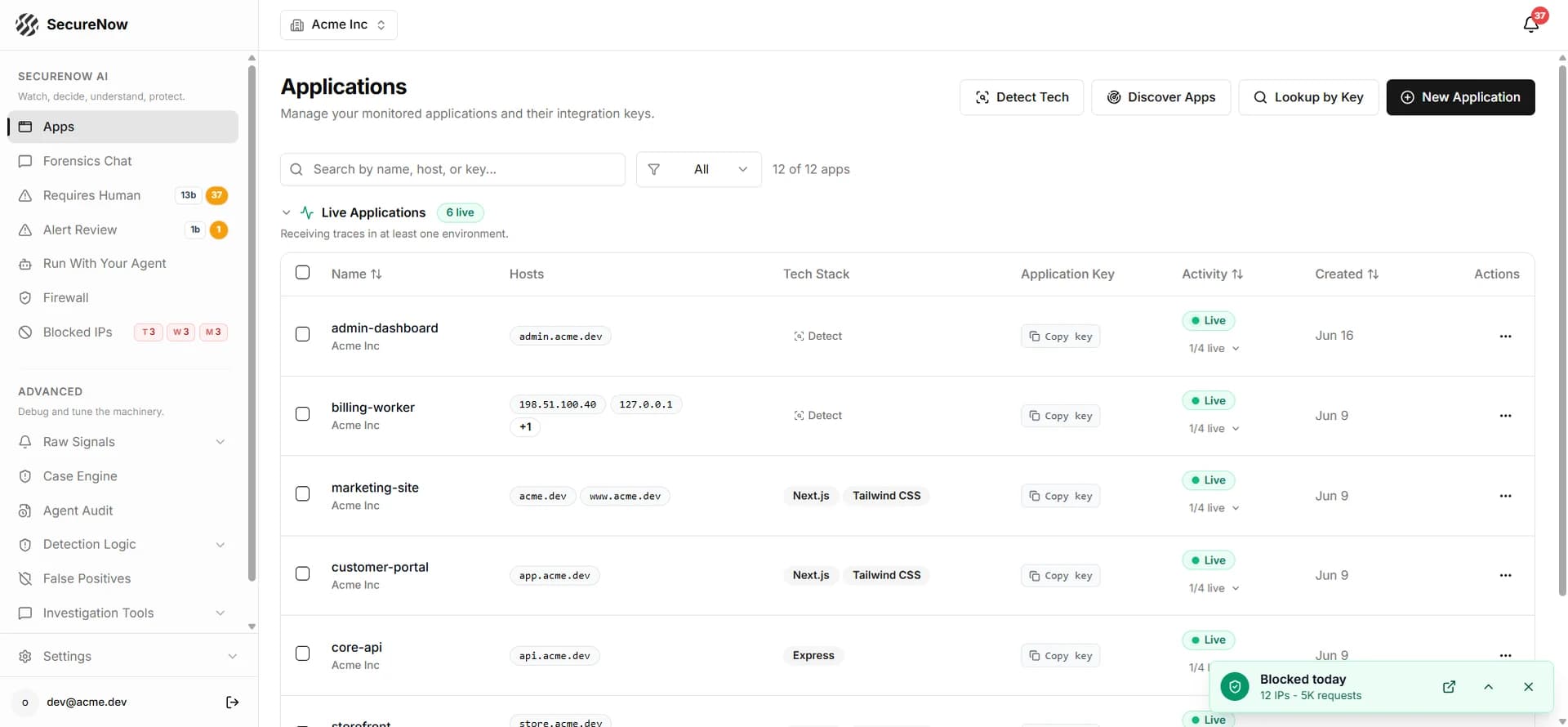
Every app and API in one place
Live status, hosts, and tech stack for each app, across production, staging, and preview.
Real dashboard screens. App names, emails, and IPs are replaced with demo values.
Protect, investigate, and threat-model in one loop.
Use it from the dashboard, the CLI, or your coding agent.
Firewall
Known-bad IPs from a live threat feed, refreshed hourly, blocked in-process with HTTP 403. No proxy, no DNS change.
How the firewall worksDetections on live traffic
SQL rules over your traces and events — written by your agent, validated, and tested before they go live.
AI investigations
Alerting IPs get a reputation check, a trace and log review, and a verdict with a proposed action.
IP and range blocking
Block an IP or a CIDR range everywhere or on one route, with an optional expiry and full history.
Rate limits
Per IP or global, by route and method, written from a plain-English sentence. Over the limit: HTTP 429.
Bot challenge
An invisible proof-of-work check between rate limit and block. People pass in about a second; simple bots don't.
Login and session protection
Stream sign-ins with track(), tag sessions with guard(), and revoke a stolen session in one command.
Forensics
Ask questions about your traffic in plain English and get the query, the rows, and a chart.
Threat modeling
Your agent audits your code across 25 categories and turns each risk into a tested detection.
See the 25 categoriesYour agent proposes. You decide.
Handing an agent production controls should feel safe. These guardrails are built in; your agent's own approval settings add another layer.
Read-only runbooks by default
The built-in agent runbooks prepare write calls for you to review instead of executing them.
Confirmation on every write
MCP write tools refuse to run without confirm: true and a reason.
Every agent action logged
Writes land in Agent Audit, so you can see what changed, when, and why.
Reversible responses
Blocks expire or lift in one command, rate limits come off, and revoked sessions can be restored.
Fails open by default
If SecureNow is unreachable, your app keeps serving requests. You can choose fail-closed instead.
You decide what's automatic
Keep responses approval-based, or let high-confidence detections and automation rules block on their own.
One plan. Every feature. Per app.
Try everything free for 14 days on your whole account — every app, every feature, no credit card. Then $99 per app per month.
SecureNow
Everything includedFor startups, solo founders & SMBs
$99/ app / month
Full production security for each app you connect. No tiers, no feature gates, no per-investigation fees.
Start 14-day free trial14 days. No credit card. Every feature.
Billed per app — add or remove apps any time.
e.g. 3 apps = $297/month
Every app gets
- Production attack detection on live traffic
- Firewall — known-bad IPs refreshed hourly, blocklists, rate limits
- Traces & logs with security context (7-day history)
- Custom detection rules
- Slack & email alerts
- AI investigations, with no per-run fees
- MCP server + CLI for Claude Code, Codex & Cursor
- Human-approved blocking & rate limits
- Team members
No free tier: when the trial ends, everything pauses until you subscribe — including the firewall.
SecureNow for B2B
Expert-ledFor companies that want hands-on help
Contact us
Security work done with your team, scoped to what you need and quoted per engagement.
Book a callEmail your needsOur team will contact you.
Talk to us about
- Threat modeling sessionA guided session that maps how your app can be attacked, then turns the findings into detections you can run.
- Security expert consultingWork through architecture, authentication, an incident or a pentest finding with a security engineer.
- SecureNow integrationWe set up SecureNow with your team: SDK, firewall, alerts, detections and response rules across your apps.
- Something elseMany apps, custom terms, procurement or security questionnaires — tell us what you need.
SecureNow never needs your source code.
It works from runtime signals in your instrumented app. Credentials, cookies, card numbers, email addresses, and one-time codes are redacted inside your app before telemetry leaves it. What your agent receives is also subject to its provider's data policies.
- Default field redaction; configurable capture
- Configurable firewall outage behavior
- Read vs. write MCP tools, clearly separated
- MCP writes require confirmation and a reason
- Encrypted in transit and at rest
- Delete your data anytime
Built by an engineer who has seen real attacks.

Lhoussine Omary
Founder, SecureNow · ex-SAP · ethical hacker
I build SecureNow from the attacker's side of the table. Ex-SAP engineer and an ethical hacker credited by some of the largest security teams in the world for finding and responsibly disclosing real vulnerabilities. SecureNow is the tool I wanted as a founder: practical protection without hiring a security team.
Credited for responsible disclosure by
Questions before you install.
Who is SecureNow for?
Small teams, from a solo founder to about twenty engineers, who run Node.js or Next.js in production, build with Claude Code, Cursor, or Codex, and don't have a dedicated security team. Your coding agent does the security work with SecureNow's production evidence and controls, and you approve what it changes. It isn't a SIEM for security operations teams, and the SDK only runs in Node.js apps.
Which coding agents work with SecureNow?
Claude Code and Codex install the SecureNow plugin (the MCP server plus five skills) with two commands, and Cursor adds the MCP server in one click. claude.ai, Claude Desktop, ChatGPT and any other MCP client can add the hosted server at https://api.securenow.ai/mcp as a connector and sign in with a SecureNow account, choosing read-only or read-and-respond access. Agents that can run shell commands can also drive the securenow CLI directly.
Do I need a coding agent to use SecureNow?
No. The dashboard, CLI, detections, alerts, and blocking all work on their own. The agent workflow is where SecureNow shines, though: your coding agent already understands your code, and SecureNow gives it the production side — attacks, traces, IP intelligence, and response controls.
Can my coding agent change production security controls without me?
Only with the permissions you give it. MCP write tools require confirm: true and a reason, the built-in runbooks are read-only until you allow writes, and every write is logged in Agent Audit. Keep your agent's approval prompts on to review each change. Separately, the firewall and any automation rules you enable enforce on their own.
Does SecureNow read my source code?
No. SecureNow works from runtime signals in your instrumented app and does not require a repository upload. Your coding agent handles repository access under its own permissions and data policies, including when it runs the threat-modeling prompts.
What does my agent see about my users?
Request metadata, traces, logs, and security events from your app. Sensitive fields — credentials, cookies, card numbers, email addresses, one-time codes — are redacted inside your app before telemetry leaves it. Review capture settings such as request bodies to match your policies; data returned to your agent is also subject to its provider's policies.
Do I need to change my infrastructure?
No. SecureNow runs inside your Node.js app: one npm package and a preload flag, or npx securenow init for Next.js and Nuxt. No DNS move, no proxy, no load-balancer rules. It runs on the Node.js runtime; the Edge runtime isn't supported.
Will it slow down my app?
Telemetry exports asynchronously. The firewall's outage behavior is configurable: its default fail-open mode allows requests when SecureNow is unavailable, while fail-closed mode can reject them. Measure the integration with your own traffic and choose the behavior your application needs.
How is SecureNow different from an observability MCP server?
Observability MCP servers give agents errors, traces, and metrics. SecureNow is built around attacks: it detects them in your traffic, investigates the IPs and sessions involved, and gives your agent response controls — blocks, rate limits, challenges, detection rules, and session revocation through the CLI — that take effect inside your app.
Does my application need AI or LLM features?
No. SecureNow gives your coding agent evidence about a deployed web application: requests, traces, logs, attack signals, and response controls. Claude Code, Codex, or Cursor can investigate an ordinary Node.js or Next.js application using the same workflow.
How much does SecureNow cost?
$99 per app per month, with every feature included: attack detection, the firewall, traces and logs, custom detections, alerts, AI investigations with no per-run fees, the MCP server and CLI, and team members. Each app on your account is billed separately — three apps cost $297 per month — and you can add or remove apps any time, prorated. Companies that want hands-on help (threat modeling sessions, security expert consulting, or SecureNow integration) can book a call or email the team at securenow.ai/contact-sales for a quote.
What happens when the 14-day trial ends?
The trial covers your whole account — every app and every feature — with no credit card. There is no free tier, so when the trial ends, everything pauses until you subscribe, including the firewall.
Give your agent eyes into production in about two minutes.
14 days. No credit card. Every feature. Then $99 per app per month.